-
Log in with your HANCard, a personal card, or with a PIN code.
a) When you use your HANCard or a personal card, put your card on the card reader next to the user panel until you hear a beep sound.
ATTENTION! You need to connect your personal card to your HANaccount before you can use it.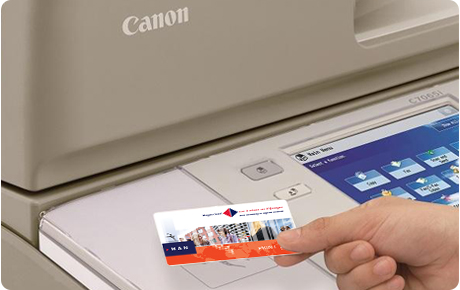
b) When you use a PIN code, tap on [PIN code], enter your PIN code and tap on [Login].

- The main screen opens.
Note: To change the language of the display tap on the language button:
Tap on [Scan].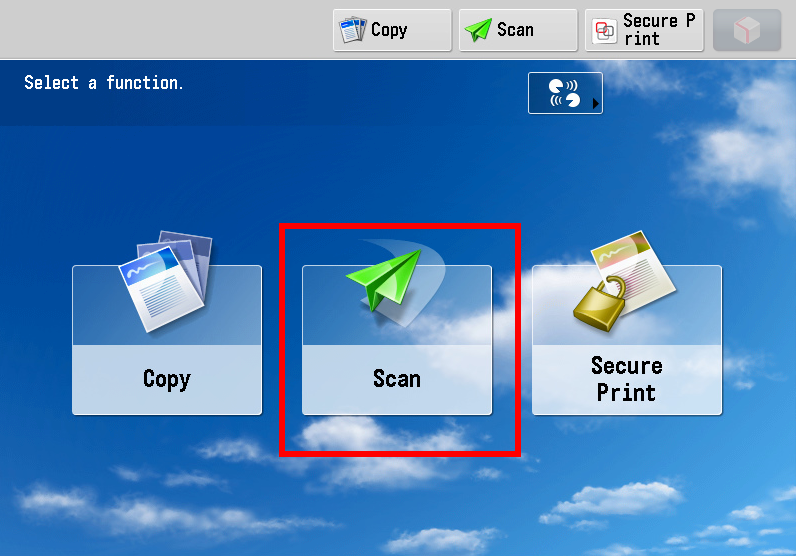
- Place your originals face up in the automatic document feeder
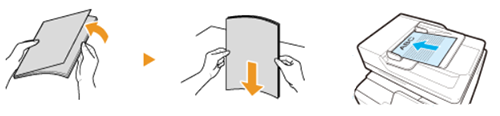
or face down on the glass plate.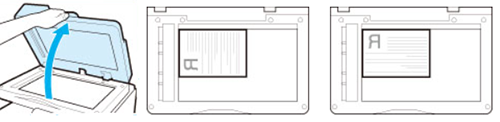
-
Use the arrow buttons to select the correct scan template and adjust the scan settings if necessary.


- Press the green button
 . Your scanned documents are sent to your default email address or to your home folder.
 - Log out.
ATTENTION! For security reasons you will be logged out automatically after 5 minutes.
Put your card on the card reader until you hear a beep sound, or tap on [Log Out].